LAN over power supply network
Everyone is faced at least once with the problem to provide computer access point to a place that is physically inaccessible due to structural obstacles or due to unable to lay the new route (it would be broken esthetic appearance of the room). For example, you have changed your old TV with new one that has a LAN port, but when the wiring was done it is provided only electrical outlet. Another example is the situation when the cable trace that you need to build will go through someone else’s property. Possible solution furthermore to use WiFi Access Point, is to use existing electrical wiring in the home (dotted line in the picture below)

Disadvantages of WiFi is that it can not be used in places where there is strong attenuation of radio waves (2,5 GHz or 5 GHz) and require several devices to achieve good speed and strench of the signal, which is the least uneconomical.You come to the aid devices that use a transmission medium already established – the power supply grid in the home.
Will be discussed in detail lan adapter model TL-PA411 AV500 Mini Powerline Adapter manufactured by TP-LINK Technologies Co., Ltd., It turns every power socket into a LAN port, with Internet running over the household power circuit at a range of up to 300 meters. Having in mind that the main features are owned by almost all those devices.It doesn’t affect the electrically equipment that uses the network and is used for construction and (fuses, RCDs, contactors, relays etc.)
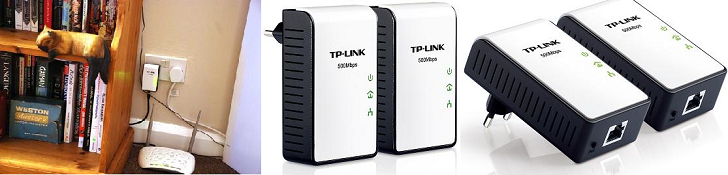
Considered lan adapter uses the HomePlug AV standard adopted in August 2005. Standard allows data transfer and flow of video and audio including the high-definition TV (HDTV). Its purpose is to provide transmission of video in high quality, high security of connection and integrated algorithm QoS, at a price which is competitive with other technologies for data transmission in the home. On the physical level is used OFDM (Orthogonal Frequency Division Multiplexing) modulation. At its base stands using the frequency division signalin which the High Speed data stream is broken down into several relatively low speed flows each of which is transmitted on a separate subcarrier with subsequent incorporation into a single signal.
This LAN adapter provides bandwidth up to 500Mbps with possibility for traffic prioritization (QoS) so that voice and video have higher priority over data regarding latency. The consumption of electricity from the power supply network is less than 2,1 W. In the absence of traffic it is provided Power save mode that reduces power consumption of the device to 85%. Mode is switched on 5 minutes after turning off the device that was connected to the LAN adapter TL-PA411.
You need at least 2 LAN adapters as the first to be pluged in the nearest electrical outlet to which has present point of Structured Cabling System (SCS) of the building. Its Ethernet port is connected to the this point (or directly to a port on the switch). The second device is pluged in where it is necessary to gain access to the computer network.
Should not be pluged in the extension cords and do not placed near heat sources (stove, heaters, etc..) and to ensure against spilling of liquids and moisture.
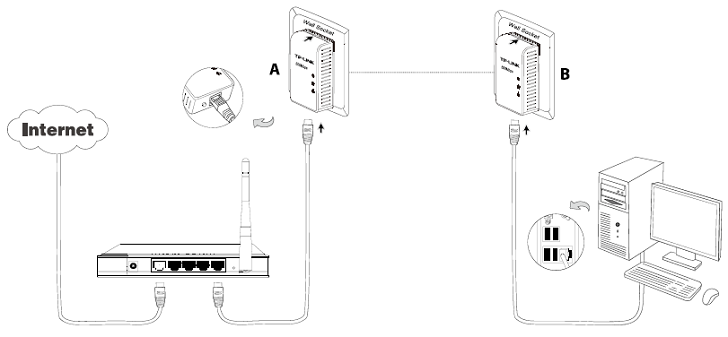
Once LAN adapters are pluged in the electrical outlets (which should be assured computer network), on the computer must be installed Management Utility software to set up the connection. Installation is simple and not time consuming.
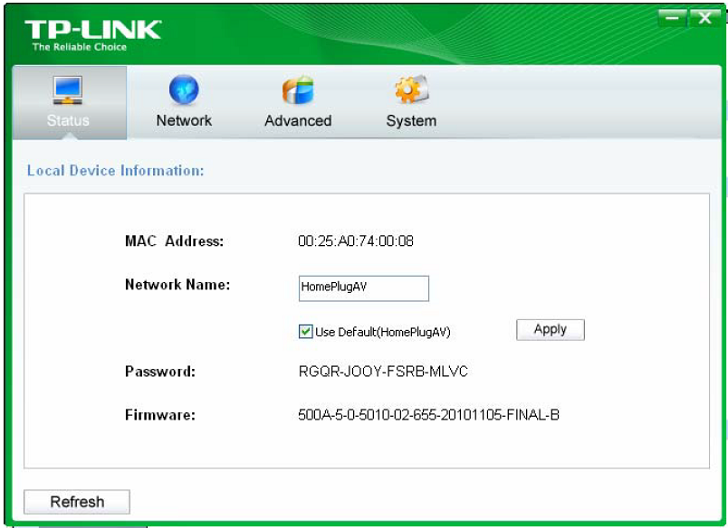
Each device has a name and a password that is preset and can not be changed. It is written on the back of the device and has the following format: XXXX-XXXX-XXXX-XXXX. With their help you can set up the parameters on the LAN adapter. The following figure shows status of LAN adapter (in this case adapter B ) which is connected to the computer (the computer has Management Utility software already installed), and through connection to this LAN adapter will take palace set up off all others LAN adapters.
Then you should go to the Network tab:
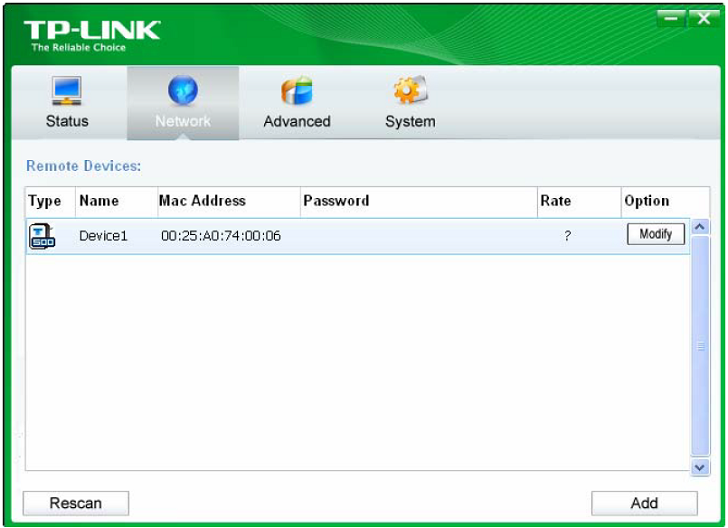
There you can see all LAN adapters pluged in your power supply network. If necessary, click Rescan which will update the list of LAN adapters (for example, if you added a new one). To create a network in which take part only your adapters and to be able to manage them all at once you must set network password (as in the more familiar WIFI AP) The default password for the network is not completed (left blank) and the name of the network is HomePluAV. For each device, press the „Modify“ button in colum „Option“ under which opens the login screen of the selected LAN adapter.
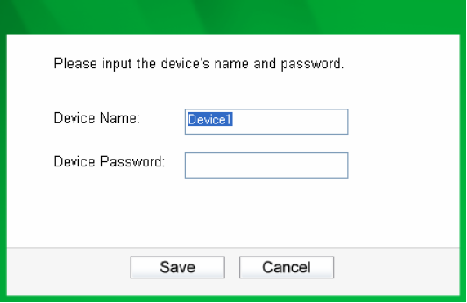
There you enter his name (Device1) and the password that is written on the back of the LAN adapter XXXX-XXXX-XXXX-XXXX, which suggests that you must have physical access to read it. Then you can set up the network name and password for the network that will build. You can change the name of the remote adapter to an easy-to-remember one. Additionally, you can select the desired adapter and enter its password (Take note of the password format) so as to set the network name of this device on Status configuration homepage.
This deals with all lan adapters who will participate in the network. Network password must be the same for all devices to communicate with each other.
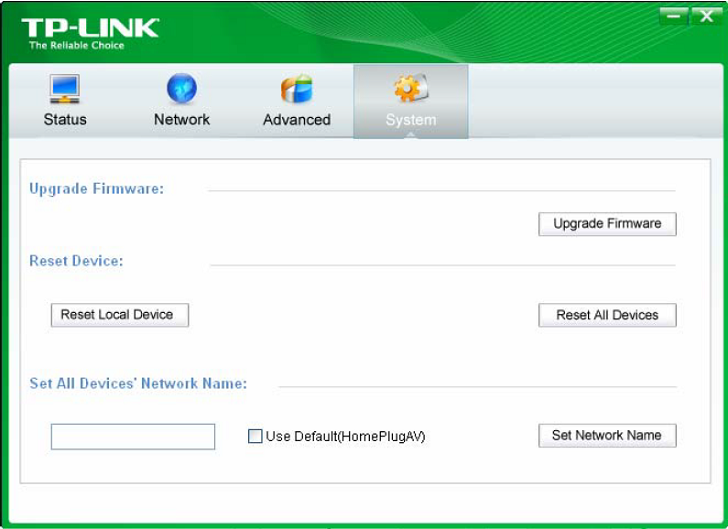
In the System tab once you have set all adapters have the opportunity to change the name of network to all adapters simultaneously, to reset your all LAN adapters or just particular one. So there is an opportunity for upgrade the firmware of devices.
If lan adapters are used in two adjacent apartments and they are part of two different networks, except network password an 128-bit AES (Advanced Encryption Standard) encryption of the connection is provided . It is done by pressing the hardware button called Pair locatetd on every LAN adapter, so you must have physical access to them. You can secure only two devices at a time simultaniosely by pressing the Pair button for 1sec and then within 2 minutes you should press the Pair button and the second device.You have to wait about 60 seconds until both adapters encrypted link between them. If third adapter is needed to be added to the other two, repeat the procedure with one of the already connected and encrypted LAN adapters and the new one.
To reset a LAN adapter and leave the network which it is associated with and its network name assumes a random value, a Pair button must be pressed for at least 10 seconds. The Power LED of LAN adapter will momentarily extinguish during resetting, flash during restarting then illuminate steadily.
You can buy this device from here: